
SIRI PASSPHRASE
Case Study

PRODUCT: Siri Passphrase – Safer Hands-Free Unlocking
PRODUCT GOAL: Make Siri truly hands-free without compromising user security, especially during activities like driving.
MY ROLE: Product Manager — led a self-directed project to improve Siri’s hands-free experience by identifying real-world user pain points, defining product goals, mapping secure voice-authentication flows, and designing supporting wireframes.
Note: This is a conceptual project created independently as part of my product management portfolio. It is not affiliated with Apple.
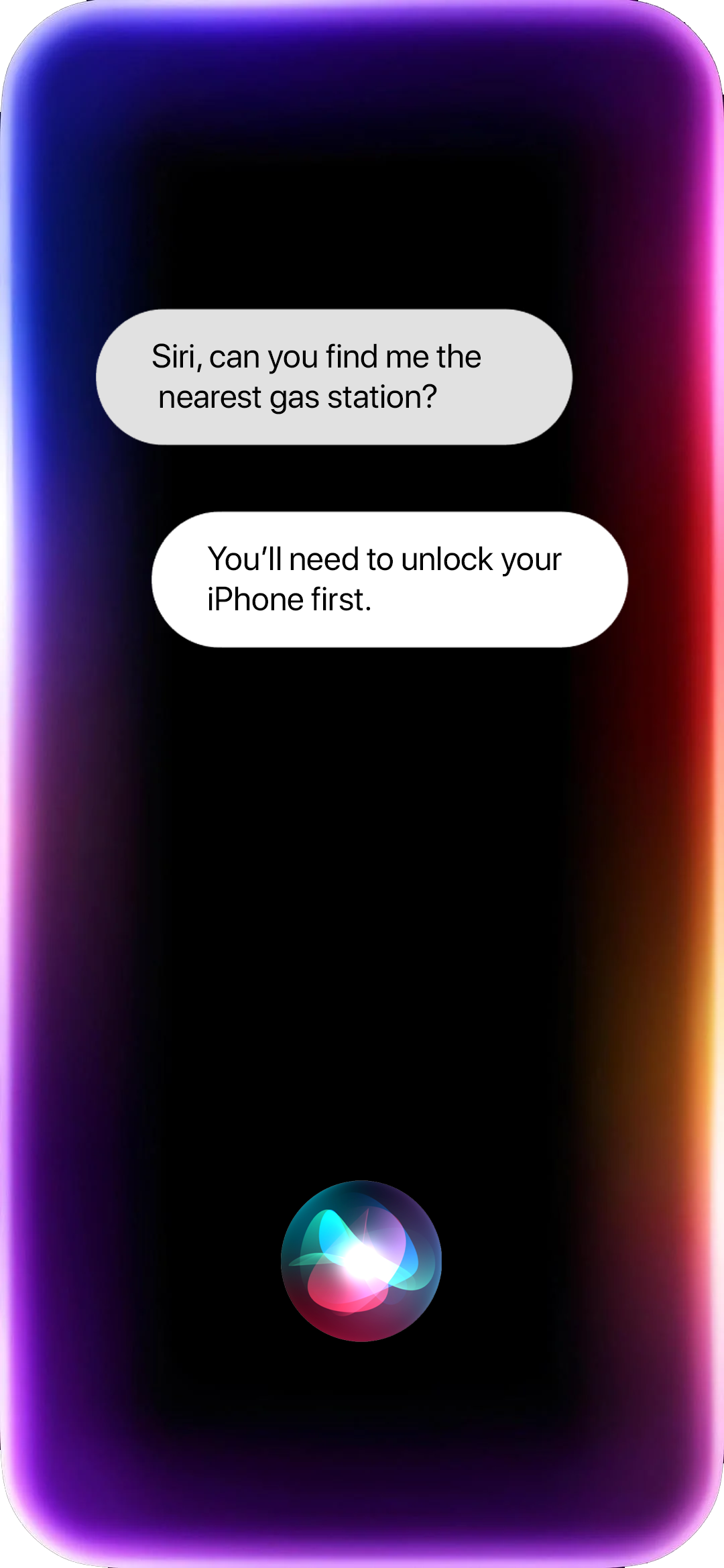
PRODUCT OVERVIEW
Siri is Apple’s voice assistant, designed to help users perform tasks and access information hands-free across Apple devices. While it’s meant to support convenience and accessibility, Siri often disrupts the experience by requiring users to unlock their devices, even in hands-free contexts like driving or cooking.
This self-directed case study explores a redesign of Siri’s voice access flow, aiming to improve hands-free usability in real world situations without compromising device security.
PROBLEM
Siri often interrupts hands-free requests by prompting users to unlock their iPhones before completing even basic tasks. This creates friction in scenarios where users expect true hands-free functionality, such as when driving, cooking, or working with their hands. For example, a driver asking for directions or a cook requesting a recipe may be forced to interact with their device physically, undermining both safety and convenience.
While this restriction likely exists for security reasons, the lack of alternative authentication methods like voice-based security leaves users with limited and frustrating options.
MY CONTRIBUTIONS
Identified a critical hands-free usability issue in Apple’s Siri experience
Validated the problem using user feedback from public forums (e.g., Reddit)
Defined a focused problem scope and proposed a solution aligned with Apple’s security and UX standards
Designed user flows and mock wireframes to demonstrate the proposed experience
Developed a product narrative that balances usability, accessibility, and safety
RESEARCH & TARGET AUDIENCE
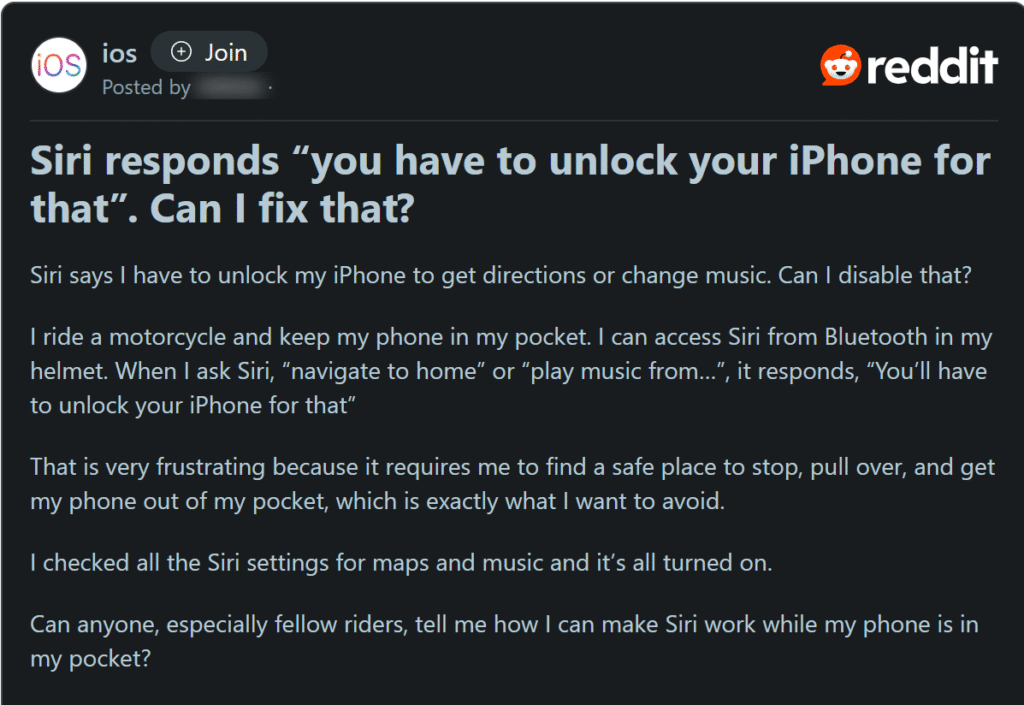
To validate the relevance of this problem, I explored public user feedback on platforms like Reddit and YouTube. Many users expressed frustration with Siri requiring device unlocks for simple tasks, even when hands-free usage is critical, such as while driving or cooking. I also used AI-assisted analysis to quickly scan and cluster common pain points across multiple user discussions.
For instance, one user highlighted their inability to get directions or play music without unlocking their phone, undermining the core promise of voice assistants: convenience without physical interaction.
Screenshot of a reddit user expressing their frustration:
Proto Personas:
To better understand the context of these frustrations, I created two proto-personas based on recurring user needs and behaviors seen across these forums:
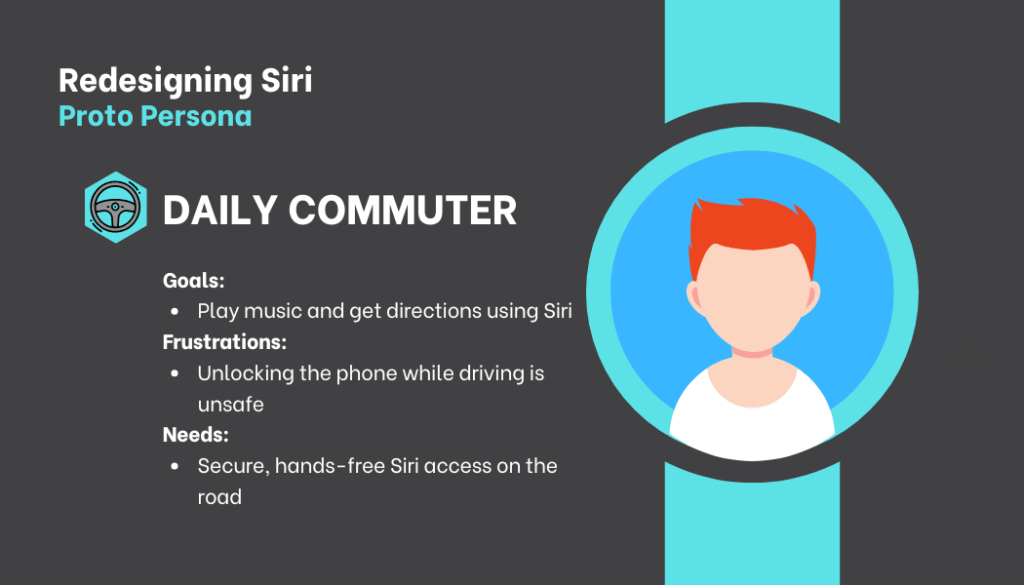
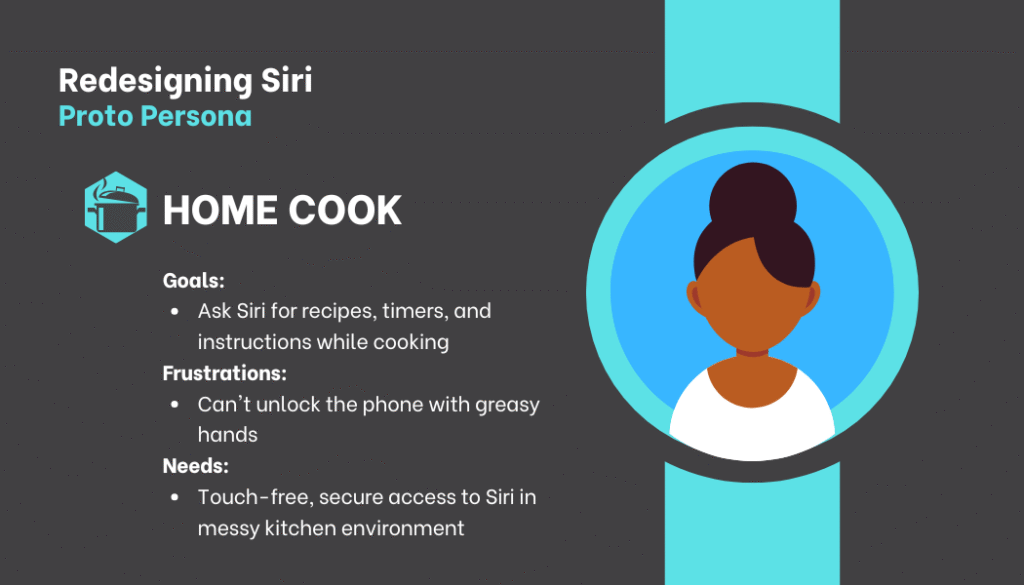
These personas are based on assumptions and inspired by real user frustrations shared online. While I did not conduct direct interviews, they helped me frame the problem and shape a solution in this self-directed case study.
COMPETITOR ANALYSIS
Purpose
To explore how other voice assistants manage hands-free tasks when the device is locked, and identify usability gaps that informed this redesign.
| Voice Assistant | Hands-Free Access When Locked | Authentication | Usability Highlights | Limitations |
|---|---|---|---|---|
| Google Assistant | Yes, via Voice Match | Voice Match authenticates personal requests | Supports navigation, music, and messaging hands-free | Voice Match may occasionally require additional verification |
| Alexa (Echo Devices) | Always hands-free (no screen lock on devices) | N/A (standalone device) | Fully voice-driven, ideal for home/kitchen | Dependent on device ecosystem |
| Siri (iPhone) | Limited, often requires unlocking | No personalized voice authentication | Can set timers and send texts hands-free | Requires unlocking for many tasks, frustrating user experience |
This analysis shows that while Google Assistant and Alexa balance convenience and security effectively, Siri’s strict security measures often interrupt hands-free use, causing frustration in real-world scenarios like driving or cooking. This insight guided the focus of my redesign to improve Siri’s usability without compromising Apple’s strong security standards.
GOALS
Enable a truly hands-free Siri experience, especially in situations where touching the phone is difficult or unsafe like driving or cooking.
Maintain or strengthen Apple’s security and privacy standards while improving usability.
Minimize user frustration caused by unnecessary authentication steps during routine voice commands.
Ensure consistency in Siri’s behavior, reducing confusion when users expect it to “just work.”
PROPOSED SOLUTION
To improve Siri’s usability in hands-busy situations without compromising security, I designed an optional voice passphrase feature, enabling users to access locked Siri functions by speaking a custom phrase, offering security on par with a passcode but optimized for voice-first interaction.
Voice Passphrase
Users can set a secure, personalized passphrase.
Acts as a voice-based alternative to manual unlocking.
Designed to match Apple’s emphasis on privacy and security.
User Settings
A toggle in Siri settings to enable or disable voice passphrase.
Users remain in control of when and how this feature is used.
Security Fallback
If the voice passphrase fails twice, Siri prompts for manual unlocking.
- Sensitive features like payments or system settings remain inaccessible via voice passphrase, maintaining Apple’s existing security boundaries.
Voice-First Interaction
All prompts and confirmations are audio-based, reducing reliance on visual UI.
Ideal for driving, cooking, or other hands-busy moments.
USER STORIES
This section outlines the user stories for implementing a voice passphrase feature in Siri. These stories capture the core tasks and edge cases from the perspective of users in hands-free or accessibility-driven contexts, ensuring both usability and security.
EPIC: Unlocking Siri with Passphrase
Feature 1: Using Passphrase to unlock iPhone for Siri – Have Siri perform tasks safely in critical Hands-free situations.
- Story 1.1: As a driver, I want to use Siri to perform hands-free tasks like playing music or navigating, so I can stay focused on the road.
- Story 1.2: As a user, Siri asks me to unlock the phone with passphrase, if I’ve enabled passphrase in settings.
- Story 1.3: As a user, if I say the passphrase correctly, Siri should perform the task.
- Story 1.4: As a user, if I say the passphrase incorrectly over 2 times, it shouldn’t unlock my phone but ask me to unlock the phone manually with passcode or face ID to keep my device secured.
- Story 1.5: As a user, if Siri can’t understand my passphrase due to noise or unclear speech, it should ask me to try again.
- Story 1.6: As a user, if someone else says my passphrase, Siri should reject it if the voice doesn’t match mine.
- Story 1.7: As a user, if I’ve disabled passphrase in the settings, Siri shouldn’t let me unlock my phone with a passphrase but ask me to unlock the phone manually with passcode or face ID.
- Story 1.8: As a user, if I forget my passphrase, I should be able to reset it using Face ID or passcode from settings.
Feature 2: Enabling Passphrase in the settings – Toggling passphrase in the settings based on the user’s personal preference.
- Story 2.1: As a user, when I go to settings in my iPhone, I should see the option, ‘Apple Intelligence & Siri’.
- Story 2.2: As a user, when I enter ‘Apple Intelligence & Siri’, I should see a new option ‘Siri Passphrase’.
- Story 2.3: As a user, when I enter the ‘Siri Passphrase’ screen, I should see a toggle to ‘Enable Passphrase’.
- Story 2.4: As a user, I should also see the ‘Setup Passphrase’ option in the ‘Siri Passphrase’ Screen. The ‘Setup Passphrase’ option should only be active if the ‘Enable Passphrase’ button is toggled on.
- Story 2.5: As a user, if I’m setting up a passphrase for the first time, I should be prompted to speak a new passphrase twice to confirm.
- Story 2.6: As a user, once my passphrase is confirmed and meets Apple’s security criteria, I should be able to use it to unlock Siri for low-risk tasks.
- Story 2.7: As a user who already has a passphrase, the ‘Setup Passphrase’ screen should show me the option to change my existing passphrase.
- Story 2.8: As a user changing my passphrase, I should first verify with the existing one, then provide and confirm a new one that meets security requirements.
USER FLOWS
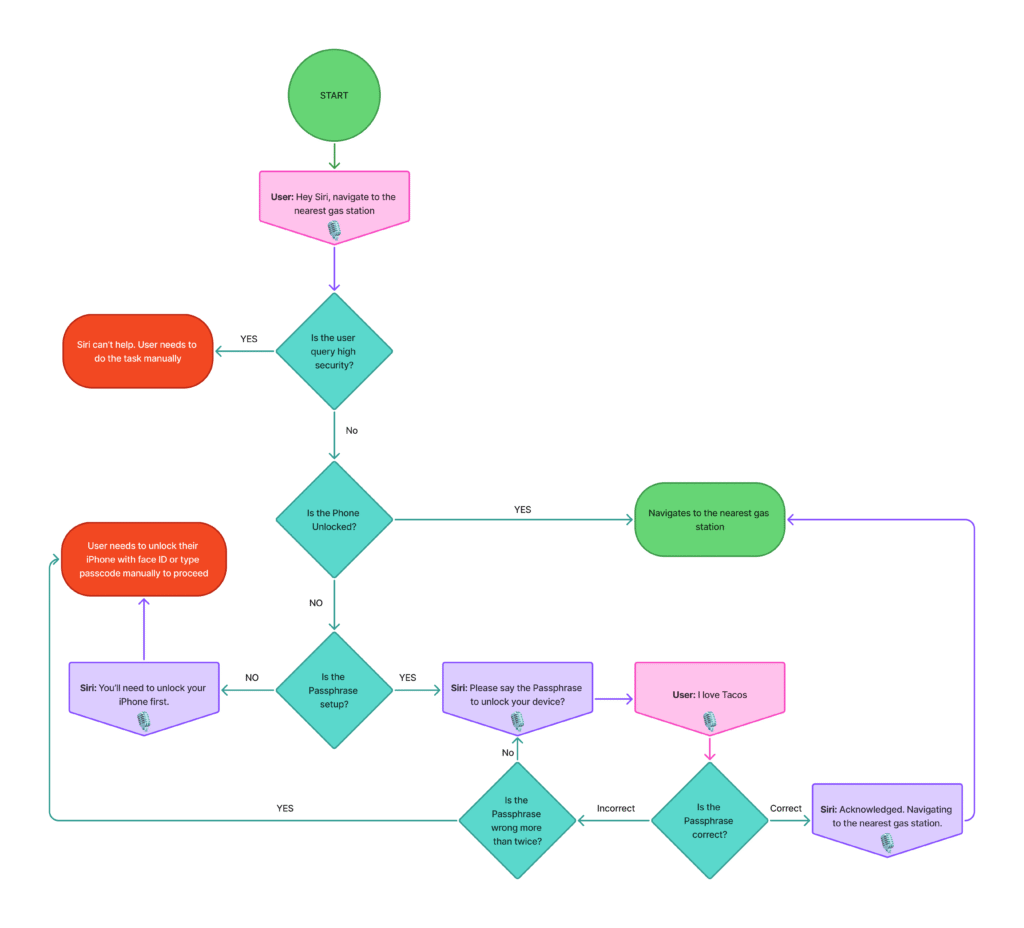
User Flow 1: Unlocking Siri with Passphrase
This flow demonstrates the interaction between a user and Siri when the device is locked. It walks through the passphrase authentication process, including voice verification, error handling for incorrect attempts, and fallback options like Face ID or passcode. The focus is on maintaining convenience without compromising on security, especially in hands-free environments like driving.
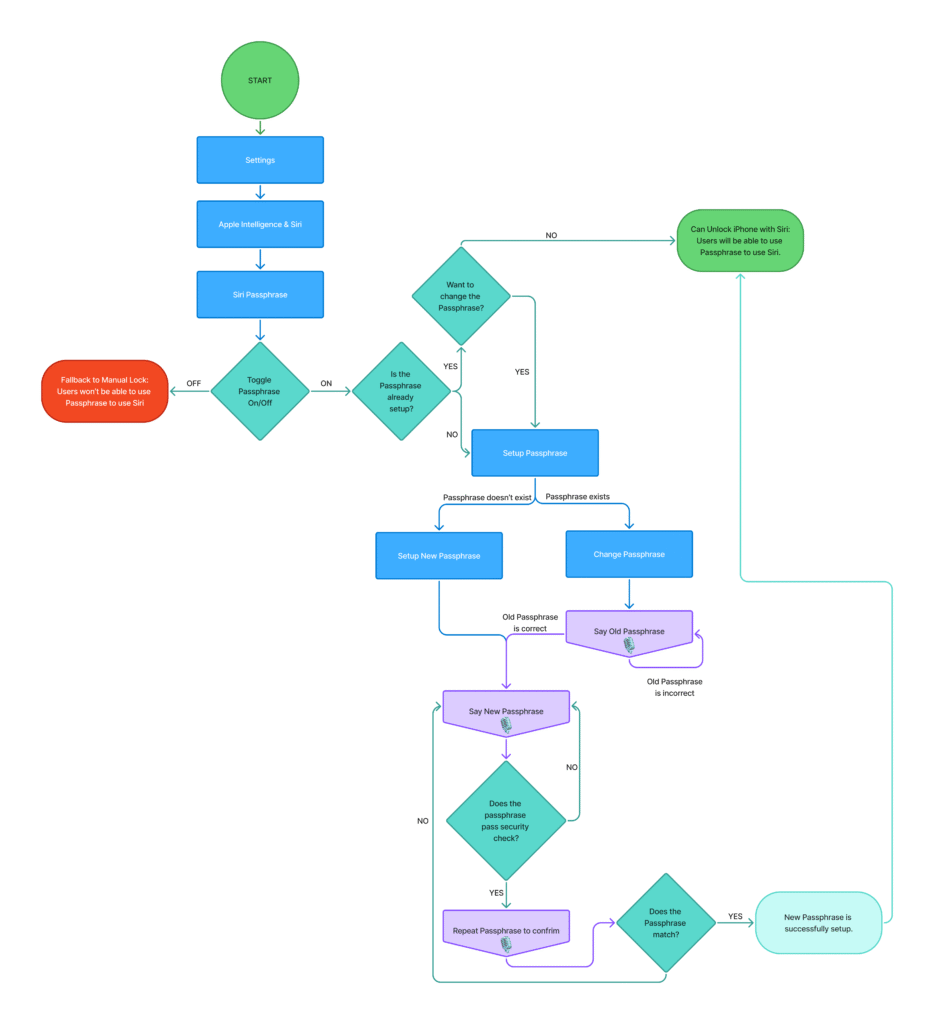
User Flow 2: Enabling Passphrase in Settings
This flow illustrates how a user enables the Siri Passphrase feature through iPhone settings. It covers both first-time setup and the ability to change an existing passphrase. The goal is to give users full control over when and how they use a passphrase for hands-free Siri access, aligning with their personal preferences and security needs.
WIREFRAMES
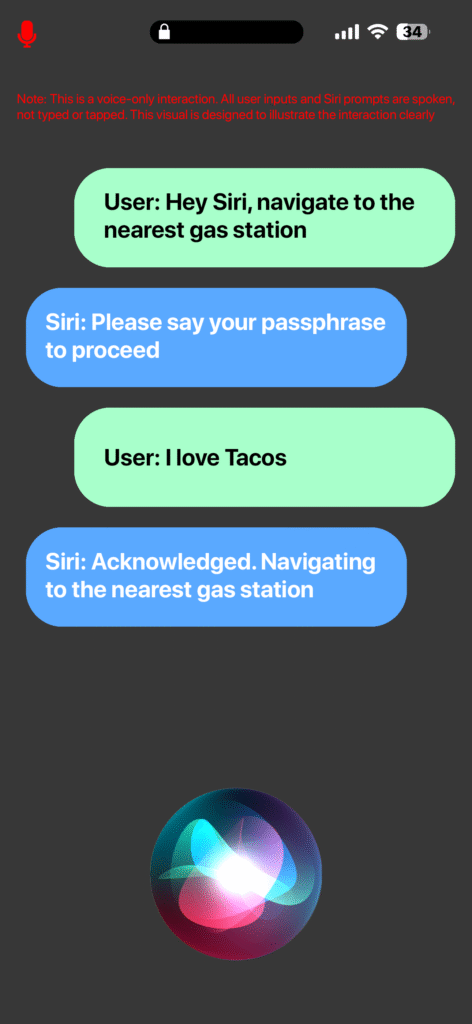
Wireframe 1: Unlocking Siri with Passphrase (Chat Simulation)
This screenshot simulates a real world hands-free interaction between a user and Siri. It shows how Siri prompts for a passphrase before executing a task, ensuring user authentication in a conversational flow. This wireframe captures the simplicity and safety of using a passphrase while driving or in other hands-free scenarios.
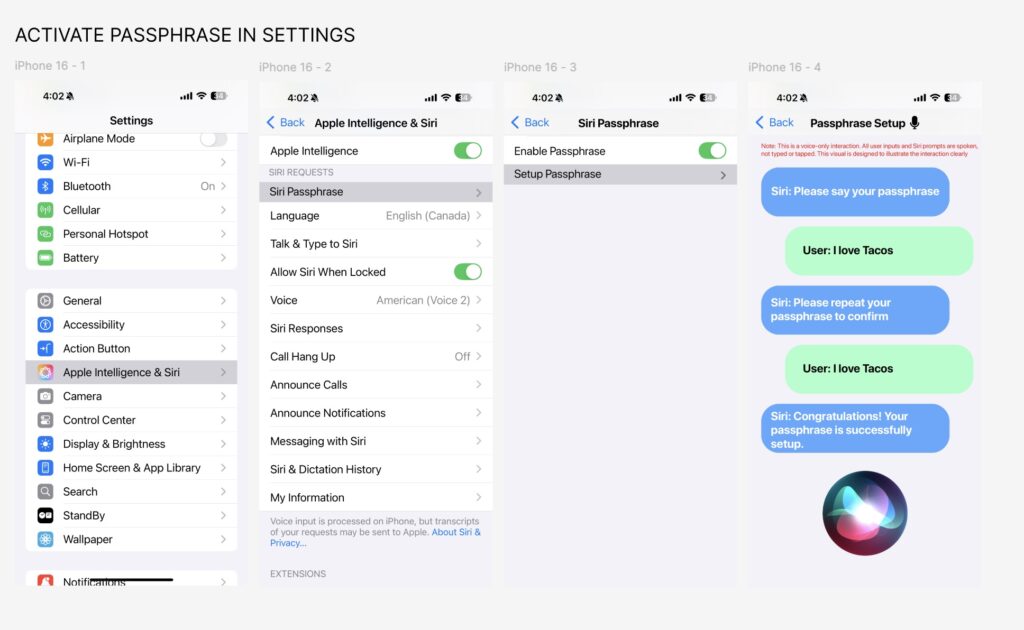
Wireframe 2: Enabling Passphrase in Settings (Figma Embed)
This embedded wireframe walks through the process of enabling and configuring the Siri Passphrase feature within iPhone settings. It visually represents how users can toggle the feature, set up a passphrase, and access related options under the newly introduced Apple Intelligence & Siri section. The focus is on clarity, accessibility, and user control.
HOW I’D MEASURE SUCCESS
To evaluate whether the Siri Passphrase feature meaningfully improves hands-free usability, I would track:
Completion rate of hands-free tasks without requiring device unlock (e.g., music playback, navigation, timers).
Reduction in user friction during hands-busy scenarios, especially while driving or cooking.
Drop in complaints or negative feedback around Siri access issues on forums or YouTube videos.
Increase in Siri usage frequency when “Allow Siri When Locked” is enabled.
User satisfaction feedback through targeted surveys or in-app prompts, focused on convenience, security, and reliability.
IMPACT & REFLECTION
Working on this case study gave me the opportunity to dive deep into the intersection of voice usability, safety, and system security. It challenged me to think like both a product designer and an end user, especially in high-stakes, real world scenarios like driving. Here’s what I took away from the process:
Developed a stronger appreciation for designing in hands-free, voice-first environments, where clarity and fallback handling matter.
Practiced balancing user convenience with security, especially for unlocking and authentication flows.
Used user feedback from public forums to validate pain points and prioritize features based on real-world needs.
Simplified technically complex ideas into accessible user flows and wireframes.
Learned how small UX tweaks, like an optional passphrase, can meaningfully improve user trust and feature adoption.
Strengthened my ability to align with existing platform constraints while still proposing impactful improvements.
CONCLUSION
This case study demonstrates how a small, thoughtful feature like a voice passphrase, can significantly enhance usability without compromising security. By addressing a real world need through user centered design, I aimed to improve Siri’s hands-free experience in a way that’s both practical and scalable.
CHECK OUT OTHER CASE STUDIES
CussMe
A Slang and Language App

AI Sidekick
Instant Tech Brainstormer

YouTube Ghost
For Simplified Private Viewing